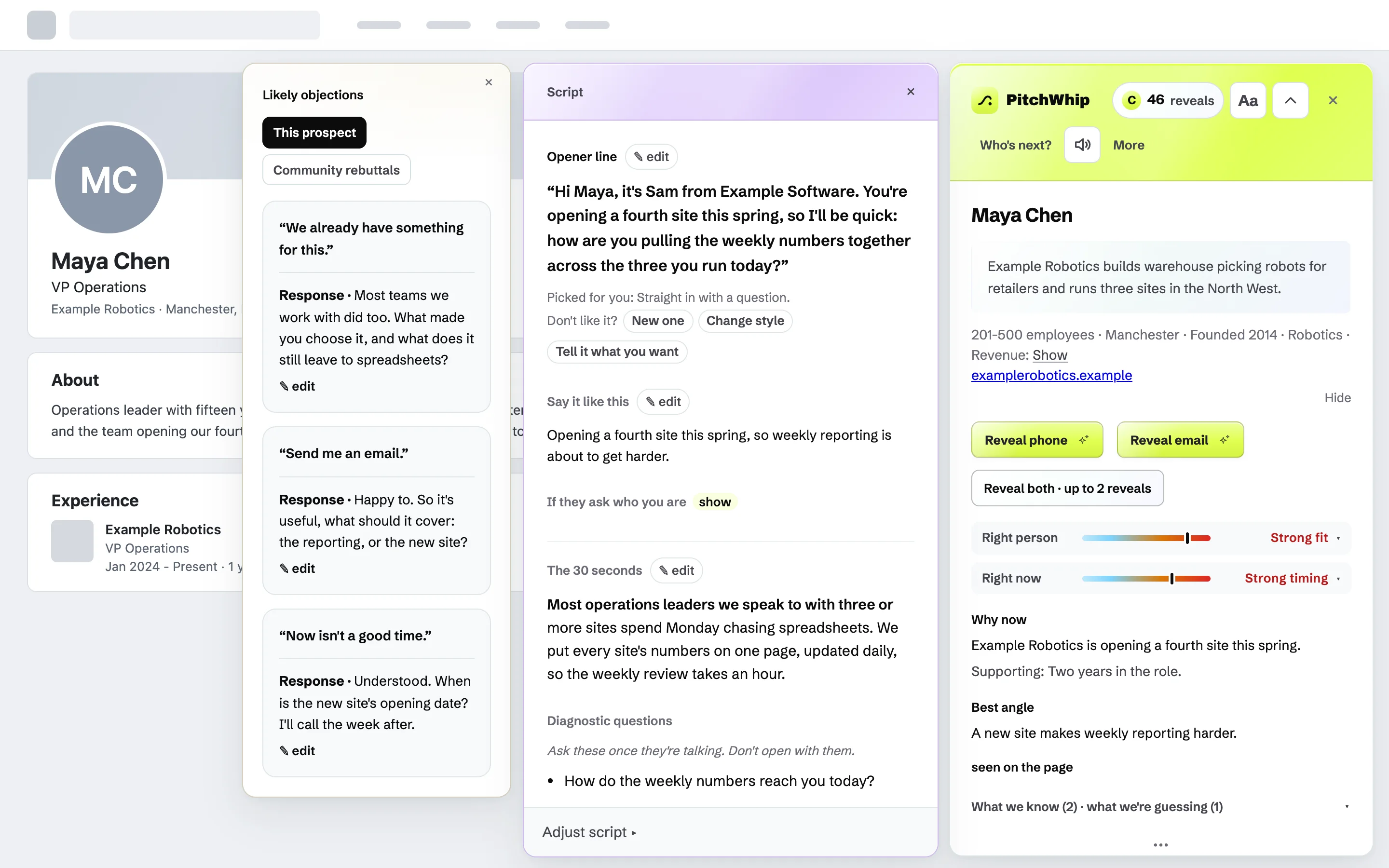
For the rep
Open a LinkedIn profile: their direct dial and their call script.
Get a company brief and an opener to review beside the profile. Reveal a phone number when you need one. You make the call.
Free: 5 scripts a day, and your first number free, plus 4 more with your email. No card. PitchWhip never presses Send on LinkedIn. Desktop Chrome.
A miss costs 0 credits, and a dead number is re-credited when you report it within 30 days. Written into the terms, not the FAQ. Runs only on linkedin.com. What leaves your browser, and where it lives: security.
PitchWhip
50 revealsPriya Nair
Kestrel Health posted 14 clinical roles this month, triple their usual pace.
Opener line
✎ edit“I saw fourteen clinical roles advertised. How are you handling the search for those hires?”
If they say
“We already work with two agencies.”
Answer · Understood. Is there any part of hiring you would want help with, or is it covered?
Direct phone
+44 7700 900 182
Work email
p.nair@kestrelhealth.com
Next up: Marcus Webb · Fenland Freight
→An illustration of the panel, animated for this page. Priya and Kestrel Health are invented.
See the call workflow
Watch the 2½-minute demo. No sign-up needed.
How it works
Know who you’re calling, what you’re going to say, and the number, before you dial.
Open the profile
Open a LinkedIn profile or Sales Navigator lead and press PitchWhip. It uses the profile and sourced company context to draft the brief and opener. Review the fit, timing and suggested angle before calling; the brief can flag weak fit or missing evidence.
Reveal the number
One click, and the direct dial or the work email lands on the same card. A phone and an email are separate credits.
Make the call, log it in one tap
You dial from whatever phone you already use. Hang up, tap the outcome, and the next name is waiting with its script ready. Callbacks schedule themselves, a follow-up email is drafted from the call, and if you want them, your notes and their likely objections sit on screen while you talk.
5 scripts a day, and your first number free, plus 4 more with your email. No card.
Try the call workflow free
Free
5 scripts a day. Your first number free, plus 4 more with your email. No card. Desktop Chrome.
Email me the install linkPro: US$49 per user, per month
50 phone-or-email credits each month, plus prospect discovery and email sequences. Phone and email reveals use separate credits; contact availability varies.
See plans and limits →Where the number comes from
One database only knows what it already holds.
Our partner searches a network, live.
PitchWhip has no contact database of its own. Press Reveal and our contact-data partner runs the search across a network and returns the strongest match.
The network is our contact-data partner's, built from its own upstream suppliers.
If none of them has it, the credit goes straight back.
A direct dial or a work email, priced the same. Fifty a month come with a licence.
Dead number, or it reaches the wrong person? Report it from the extension within 30 days. A person checks it and you are re-credited.
Prospect discovery · new
A fresh list every morning, sources cited.
Every morning, ask PitchWhip for up to 10 fresh prospects who match your pitch. It searches the open web (trade-press appointment announcements, movers-and-shakers columns, team pages). Every person arrives with a verbatim quote and its source, so you can check they hold that role before you dial. Review each source before outreach.
- The evidence travels: open a discovered prospect and the script already knows why they made the list.
- Every find is kept automatically until you’ve called them, on any machine your licence signs into. Queue the good ones; bin the rest and they never come back.
- Tell it where your patch is, and the search prefers people based there.
Prospect discovery is included in the paid plan: $49 a month, with one deep search a day per rep. Start free with 5 scripts a day and your first number; discovery needs the paid plan.
After the call
After the call,
keep the follow-up moving.
Add the people you want to follow up with, review the messages and set the timing. Email steps send automatically; calls and LinkedIn messages become tasks for you. Use your mailbox for existing relationships, or a verified campaign domain for cold outreach.
It starts slow, on purpose
A new mailbox starts with a daily cap of five emails. The cap rises by three a day, with no more than three sends in five minutes. Choose sending hours for each country; the default is weekdays, 08:00 to 17:30, skipping public holidays.
It watches the bounces
Once a mailbox has sent twenty emails in the past week, a bounce rate above 5% pauses it and tells you why. That rate check starts at twenty sends; other sending and do-not-email checks apply from the first message.
Stop when someone responds
For mailbox sends, turn on reply-stop and add the forwarding rule shown in Settings. A matching reply stops the sequence. For campaign-domain sends, mark the person as replied yourself. Every sequence email includes unsubscribe; open tracking is optional.
Cold mail cannot use your address
A sequence sending from your mailbox will only ever email someone who came to you, bought from you, or replied to you. Anything colder is refused at the moment of sending, not just when the name went on the list.
Cold outreach uses a subdomain you verify. This separates campaign configuration from your everyday mailbox, but does not guarantee isolation from reputation problems.
Bring a list if you have one: up to 5,000 people, read in your browser, so the file itself never leaves it. A sequence can work any slice of it, and what comes back is the reply rate, the bounce rate, and what stalled.
All of it is included at $49 a month.
Email is the only thing that sends itself. How sequences work, step by step →
You control the send
Your LinkedIn account. You control Send.
Automated messaging can lead LinkedIn to restrict or suspend your account. PitchWhip drafts the message; you review it and press Send yourself.
- Reads the profile you're already looking at.
- Opens and fills LinkedIn's own note, message and InMail boxes. You press Send, one at a time.
- By default, LinkedIn steps run on the profile you open. An optional acceptance check can open profiles in background tabs while your LinkedIn tab is focused; it is off unless you enable it. You still press Send.
Exactly what happens on a LinkedIn step
A sequence’s LinkedIn steps never send themselves: they arrive as tasks in Who’s next?, because our server has no way to act on your LinkedIn account and never touches it.
On a connection note, you press Connect. LinkedIn opens its own invitation box. PitchWhip presses “Add a note” to open the field, writes the note into it, and tells you to read it. Then you press Send. That is one of three of LinkedIn’s own controls it ever presses. The other two are the Message button on a profile and the same control on a Sales Navigator lead page; it fills the box, you press Send.
An InMail box never opens on its own: it spends a credit you paid LinkedIn for, so it opens only when you ask for it. Then the subject and message are written for you to read before you press Send.
Do the maths
Compare the contact allowance and the call tools.
PitchWhip is $49 with a brief and opener to review.
Lusha Starter is $49.90 monthly for 400 credits; a phone reveal costs five credits. That is up to 80 phone-credit equivalents, about $0.62 each if every credit goes to phones. Kaspr Starter is $65 monthly with 100 phone credits. PitchWhip includes 50 contact credits for $49, plus the brief, script, objections and call log.
What is preparation costing you? As an illustration, 40 prospects at two minutes of research each means 80 minutes preparing. Try PitchWhip on your next few prospects and compare the time and the quality of the brief. The $49 plan includes 50 contact finds a month; additional finds need a top-up.
| At monthly list price | Lusha Starter | Kaspr Starter | PitchWhip |
|---|---|---|---|
| Monthly price | $49.90 | $65 | $49 |
| Credits a month | 400 | 100 phone | 50 |
| Credits a phone number | 5 | 1 | 1 (or 1 an email) |
| Phone-credit equivalents | Up to 80 | 100 | 50 |
| Price per phone-credit equivalent | ≈$0.62 | $0.65 | $0.98 |
PitchWhip
$49a user a month, billed in USD
50 numbers or emails a month. Plus the brief, the script, up to 10 new prospects a day, one-tap logging, and follow-up sequences. Monthly, or $490 a user a year with two months free. Cancel any time from the dashboard, no minimum term.
Lusha and Kaspr have lower prices per included phone-credit equivalent on these plans. Prices and credit costs were checked on their official sites on 10 September 2026, using USD monthly billing. These are allowance calculations, not guarantees of available or accurate contacts. Our $0.98 is $49 spread across the 50 included credits; pack credits are $0.50 at 100 for $50. Out of date? Tell us and we’ll fix it.
Integrations
Log it once. Keep your tools up to date.
Every call you log is written to Salesforce, HubSpot or a Google Sheet you own. Nothing to export, nothing to copy across.
Salesforce
Logged calls and callback tasks on the matching Contact or Lead.
What syncs and how to connectHubSpot
Contacts, logged calls and follow-up tasks, kept together in HubSpot.
What syncs and how to connectGoogle Sheets
Contacts and a call log in a spreadsheet in your own Google Drive.
What syncs and how to connect
First build 4 August 2026. Last release 4 September 2026: sending schedules by country, with the country’s own holidays. Every release, dated →
Who it’s for
For the manager
Give new hires a brief and opener to review
Why they’d buy, why now, the objection and the opener arrive built, so nobody is versioning a script library that goes stale by March. $49 a seat, credits pooled, one invoice. As admin you see the call log and every number those credits found.
Seats, rollout and visibility, for teams →For the founder
Sales is two hours of your day, not your job title.
Founder-led sales, recruiters, one-person agencies: use one tool to find prospects, contact details and an opener to review. Spend less of your call block preparing.
FAQ
The bits people ask before they install.
Something not covered here? hello@pitchwhip.com. A human answers within one working day. And every feature is documented in the guide.
PitchWhip never presses Send on LinkedIn. It reads what is already on the page you're viewing, in your own logged-in session. When a sequence reaches a LinkedIn step it writes the words, and the last press is always yours. Email is different: connect your mailbox, add someone to a sequence, and those emails send on their own, on the schedule you set. You can stop a sequence at any time.